Language:
- Language is a medium to communicate between two entities.
Programming Language:
- It is a medium to communicate between human and a machine.
- We have various programming languages like C, C++, JAVA, Python & C#.
How a programming language is built.
- English Language.

- Java.
Tokens: It is a smallest unit of program.
- Identifiers.
- Literals.
- Comments.
- Keywords.
- Operators.
- Separators.
1. Identifiers: Identifiers are the names given for any java programs.
2. Literals: Literals are the values which are used in java programming language. In literals we have
-
Numeric Literals.
- Integers: Any number without decimal value is called as
Integer literal.
Ex. 1, 10, 25, 36 - Decimal: Any number with decimal value is called as decimal
literal.
Ex. 5.56, 76.36, 89.48
- Integers: Any number without decimal value is called as
Integer literal.
-
Character Literals: Anything which is enclosed with single quotes is called as character literals.
Ex. 'A', '9', '$' -
String Literals: Anything which is enclosed with double quotes is called as string literals.
Ex. "Hello", "123", "A", "$", "", "Hello@#123" -
Boolean Literals: We have only 2 values in boolean literal that is true & false.
3. Comments: Comments are used to provide the additional information or to skip the particular line of code. In comments we have.
- Single line comment.
// This is a single line command. - Multi line or Block comment.
/*
* This is a
* multi line
* or block
* command.
*/
4. Keywords: Keywords are the predefined words. It has its own meaning. Keywords in java are.
1. abstract      11. continue      21. for             31. new           41. switch
2. assert        12. default       22. goto            32. package       42. synchronized
3. boolean       13. do            23. if              33. private       43. this
4. break         14. double        24. implements      34. protected     44. throw
5. byte          15. else          25. import          35. public        45. throws
6. case          16. enum          26. instance of     36. return        46. transient
7. catch         17. extends       27. int             37. short         47. try
8. char          18. final         28. interface       38. static        48. void
9. class         19. finally       29. long            39. strictfp      49. volatile
10. const        20. float         30. native          40. super         50. while
5. Operators: Operators are the symbols used to perform some operations.
| Operator type | Category | Precedence |
|---|---|---|
| Unary | post fix | expr++ expr-- |
| pre fix | ++expr --expr | |
| Arithmetic | Multiplicative | * / % |
| Additive | + - | |
| Shift | Shift | << >> >>> |
| Relational | Comparison | < > <= >= instanceOf |
| Equality | == != | |
| Bitwise | Bitwise AND | & |
| Bitwise exclusive OR | ^ | |
| Bitwise inclusive OR | | | |
| Bitwise | Logical AND | && |
| Logical OR | || | |
| Ternary | Ternary | ? : |
| Assignment | Assignment | = += -= *= /= %= &= ^= |= <<= >>= >>>= |
6. Separators: Separators are used to separate the given java code.
- braces {}
- brackets []
- parenthesis ()
- semicolon ;
- comma ,
- James Gosling is a founder of JAVA in the year 1991 and the software was named as Green Talk.
- Later they renamed to Oak Oak as a symbol of strength and it is a national tree of Germany. At the same time there was already an existing company called Oka Technologies whick became a legal issue and changed the software name from Oak to Java in the year 1995.
- Java 1.0 was originally released by Sun Microsystems in the year 1995, but Oracle acquires Sun Microsystems in the year 2010.
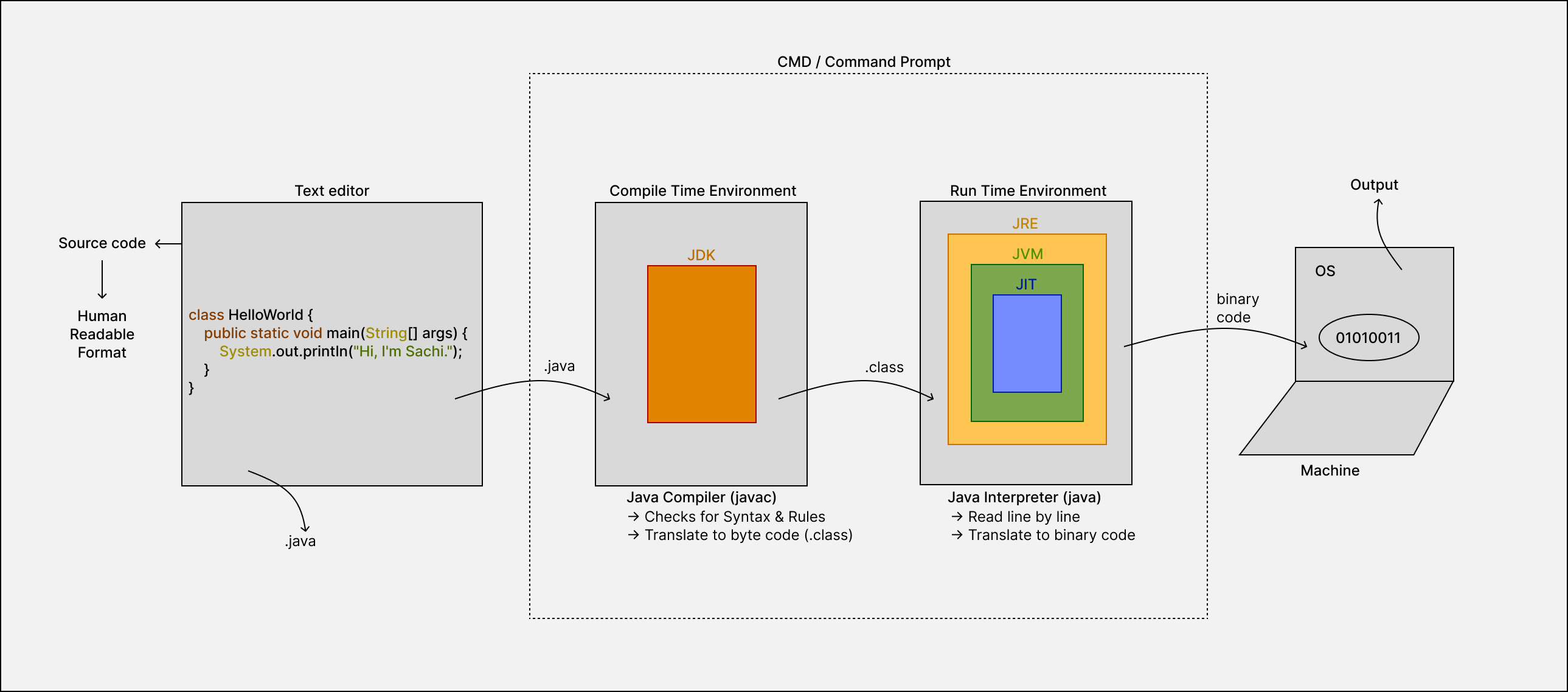
- Write java program in Text editor and save the file with .java extension.
- To convert this Human readable format to Machine readable format we have to perform 2 operations in the command prompt. That is a. Java Compiler (javac) b. Java Interpretr (java)
- The .java file will be given as an input for the compiler which checks for a. Checks for Syntax & Rules b. Translate from .java file (human readable format) to .class file (byte code format)
- If we violate any syntax or rule we will get compile time error.
- Once the .class file is generated it is an intermediate code which is in byte code format where it cannot be understood neither by humans nor by machine.
- The .class file will be given as an input for the interpreter which will converts to binary file and intern given to the OS to generate output. a. Interpreter will Read the code line by line b. Translate from .class file (byte code format) to binary code (01010011)
- During execution if we find any abnormal statements like 1/0 we get arithmetic exception that is run time error.
It is a virtual machine which doesn't exists physically & it is whole responsible to execute the java program.
It is an environmental setup provided to run java program.
It is a kit which consists of all the library files and utilities to develop a java software. It is whole responsible to convert from .java file to .class file.
It is whole responsible to convert from .class file to binary format.
Java is considered platform-independent because of its use of the Java Virtual Machine (JVM), which allows Java code to be executed on any device or operating system that has a JVM implementation, regardless of the underlying platform.
Note: Always the java program will executes from left to right & top to bottom.
- factorial.
- Fibonacci series.
- Reverse a String.
- Prime no.
- Odd even.
- Patterns.