Click here for initial table setup (Create Tables EMP, DEPT, SALGRADE and insert data)
Create DEPT table in SqlPlus.
CREATE TABLE DEPT(
	DEPTNO DECIMAL(2) PRIMARY KEY,
	DNAME VARCHAR(14),
	LOC VARCHAR(13)
);
Insert data to DEPT table in SqlPlus.
INSERT ALL
	INTO DEPT VALUES(10,'ACCOUNTING','NEW YORK')
	INTO DEPT VALUES(20,'RESEARCH','DALLAS')
	INTO DEPT VALUES(30,'SALES','CHICAGO')
	INTO DEPT VALUES(40,'OPERATIONS','BOSTON')
SELECT * FROM dual;
Create EMP table in SqlPlus.
CREATE TABLE EMP(
	EMPNO DECIMAL(4) NOT NULL,
	ENAME VARCHAR(10),
	JOB VARCHAR(9),
	MGR DECIMAL(4),
	HIREDATE DATE,
	SAL DECIMAL(7,2) DEFAULT 0.00 NOT NULL,
	COMM DECIMAL(7,2),
	DEPTNO DECIMAL(2),
FOREIGN KEY(DEPTNO) REFERENCES DEPT(DEPTNO) ON DELETE CASCADE);
Insert data to EMP table in SqlPlus.
INSERT ALL
    INTO EMP VALUES (7369, 'SMITH', 'CLERK', 7902, '17-DEC-80', 800.00, NULL, 20)
    INTO EMP VALUES (7499, 'ALLEN', 'SALESMAN', 7698, '20-FEB-81', 1600.00, 300.00, 30)
    INTO EMP VALUES (7521, 'WARD', 'SALESMAN', 7698, '22-FEB-81', 1250.00, 500.00, 30)
    INTO EMP VALUES (7566, 'JONES', 'MANAGER', 7839, '02-APR-81', 2975.00, NULL, 20)
    INTO EMP VALUES (7654, 'MARTIN', 'SALESMAN', 7698, '28-SEP-81', 1250.00, 1400.00, 30)
    INTO EMP VALUES (7698, 'BLAKE', 'MANAGER', 7839, '01-MAY-81', 2850.00, NULL, 30)
    INTO EMP VALUES (7782, 'CLARK', 'MANAGER', 7839, '09-JUN-81', 2450.00, NULL, 10)
    INTO EMP VALUES (7788, 'SCOTT', 'ANALYST', 7566, '09-DEC-82', 3000.00, NULL, 20)
    INTO EMP VALUES (7839, 'KING', 'PRESIDENT', NULL, '17-NOV-81', 5000.00, NULL, 10)
    INTO EMP VALUES (7844, 'TURNER', 'SALESMAN', 7698, '08-SEP-81', 1500.00, 0.00, 30)
    INTO EMP VALUES (7876, 'ADAMS', 'CLERK', 7788, '12-JAN-83', 1100.00, NULL, 20)
    INTO EMP VALUES (7900, 'JAMES', 'CLERK', 7698, '03-DEC-81', 950.00, NULL, 30)
    INTO EMP VALUES (7902, 'FORD', 'ANALYST', 7566, '03-DEC-81', 3000.00, NULL, 20)
    INTO EMP VALUES (7934, 'MILLER', 'CLERK', 7782, '12-DEC-83', 1300.00, NULL, 10)
SELECT * FROM dual;
Create SALGRADE table in SqlPlus.
CREATE TABLE SALGRADE(
	GRADE NUMBER(10),
	LOSAL NUMBER(10),
	HISAL NUMBER(10)
);
Insert data to SALGRADE table in SqlPlus.
INSERT ALL
	INTO SALGRADE VALUES(1,700,1200)
	INTO SALGRADE VALUES(2,1201,1400)
	INTO SALGRADE VALUES(3,1401,2000)
	INTO SALGRADE VALUES(4,2001,3000)
	INTO SALGRADE VALUES(5,3001,9999)
SELECT * FROM dual;
- Stands for
Data Base Management System. - It is a software which uses query language, by using query language, database users develop a query, the developed query is used to interact with the database to retrieve the required data as an output.
- Features of DBMS
- C - Create/Add
- R - Read/Retrieve
- U - Update/Modify
- D - Delete/Drop
- Providing Authentication for Database users.
- Providing Securities for Database.
- In DBMS data is stored in a file format & files may have different extentions
due to that
relationship can't be established.
- Stands for
Relational Data Base Management System. - Any DBMS which follows Relational model of Database becomes R-DBMS.
- It is a software which uses SQL as a language, by using SQL, database users develop a query, the developed query is used to interact with the database to retrieve the required data as an output.
- Features of DBMS
- C, R, U, D.
- Authentication.
- Securities.
- In DBMS data is stored in a table format. The table will be having a common column, we apply key fields (Primary & Foreign keys) to the common columns and establish relationship between the data.
| DBMS | R-DBMS |
|---|---|
| • The Data is stored in file format. | • The Data is stored in Table format. |
| • Relationship between the Data can't be established. | • Relationship between the Data can be established. |
| • It uses Query Language. | • It Uses SQL. |
| • Normalisation can't be applied. | • Normalisation can be applied. |
Note:
- Table / Object / Entity
- Columns / Fields / Attributes
- Rows / Records / Tuples
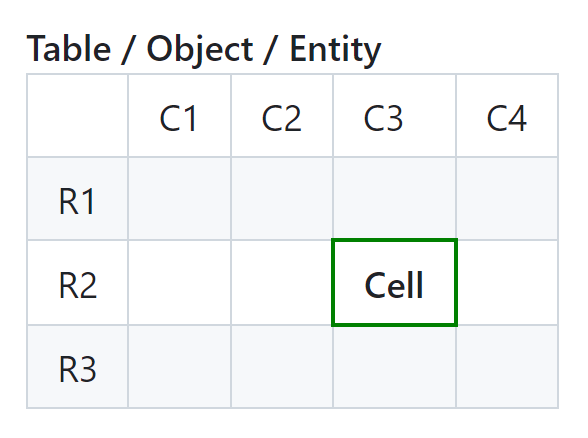
- Table: It is a combination of Rows & Column.
- Cell: It is a intersection point of rows & columns.
- Oracle DB.
- MySql.
- Microsoft SQL server.
- Postgre SQL.
- IBM DB-2.
- Maria DB.
- The type of data stored in a perticuler column of a table is called datatype.
- We can assign only one datatype to a single column.
- Datatypes are mandatory for all the columns of a table.
- In SQL we have 4 datatypes.
- Char
- VarChar
- Number
- Date
- If a column is assigned with
Chardatatype, it can store the following values.- Alphabets(A to Z, a to z).
- Numbers (0 to 9).
- Special characters (!, @, #, $, %)
- The default size for char data type is
one(1)
Example-1
| <3 | ✔ |
| =3 | ✔ |
| >3 | ❌ |
Example-2
| c1 | Correct/Incorrect |
|---|---|
| ABD | ✔ |
| 123 | ✔ |
| A2 | ✔ |
| $ | ✔ |
| 1234 | ❌ |
| $1A | ✔ |
| 0A10 | ❌ |
Example-3
| c1 | Correct/Incorrect |
|---|---|
| 0 | ✔ |
| A1 | ❌ |
| $ | ✔ |
| ABC | ❌ |
| C | ✔ |
- If a column is assigned with
VarChardatatype, it can store the following values.- Alphabets(A to Z, a to z).
- Numbers (0 to 9).
- Special characters (!, @, #, $, %)
- There is no default size for VarChar data type
(size is compulsory).
| Char | VarChar | |||||||||||||||||||||
|---|---|---|---|---|---|---|---|---|---|---|---|---|---|---|---|---|---|---|---|---|---|---|
|
|
|||||||||||||||||||||
| • The Unallocated memory blocks are filled with space, Which consumes memory. | • The Unallocated memory blocks are filled with null, Which doesnot consumes memory. | |||||||||||||||||||||
| • It follows fixed allocation of memory. | • It follows variable allocation of memory. | |||||||||||||||||||||
| • The default size is one (1). | • There is no default size. | |||||||||||||||||||||
| • We can store upto 2000 characters. | • We can store upto 4000 characters. | |||||||||||||||||||||
- If a column is assigned with
Numberdatatype, it can store onlydigits (0 to 9). - The default size for char data type is
one(1)
Example-1
| <2 | ✔ |
| =2 | ✔ |
| >2 | ❌ |
Example-2
| c1 | Correct/Incorrect |
|---|---|
| 49 | ✔ |
| 263 | ❌ |
| AB | ❌ |
| $0 | ❌ |
| A1 | ❌ |
| -49 | ✔ |
| 0 | ✔ |
Number datatype can also be user with 2 arguments.
- Example: Number(precision & scale)
- Precision: It represents the total no of digits including the decimal.
- Scale: It represents the max no of decimal values.
- Precision - Scale (p-s): It represents the max no of Integers.
Example
| c1 | Correct/Incorrect |
|---|---|
| 99.99 | ✔ |
| 9.99 | ✔ |
| 9.9 | ✔ |
| 99.9 | ✔ |
| 999.9 | ❌ |
| 9.999 | ❌ |
| 99 | ✔ |
| 9 | ✔ |
| 999 | ❌ |
| 0.99 | ✔ |
| 0.9 | ✔ |
| 0 | ✔ |
| 9999 | ❌ |
| -99 | ✔ |
- If a column is assigned with date datatype, it can store only the date values. The default date formate in Oracle is DD-MMM-YY
Example-1
| 20-OCT-21 | ✔ |
| OCT-20-21 | ❌ |
| >20/10/21 | ❌ |
- Constraints are the rules of validations applied a columns of a taable.
- Constraints are optional but highly recommended or highly preferable.
- We can apply multiple constraints for a single column.
- The Constraints used are
- Not null
- Unique
- Check
- Primary key
- Foreign key
-
Null
- It is neither zero nor space.
- It won't consume any memory.
- Any Arithmetic operation performed with a null will result in a null.
- In Oracle, nulls are not same because they are compared by their addresses.
-
If a column is assigned with not null constraint, it cannot store null values, means the caolumn cannot have empty cell but the same column can store duplicate values.
Examplenumber(3), not null c1 Correct/Incorrect 263 ✔ 56.3 ✔ null ❌ 49 ✔ AB ❌ -49 ✔ -
If a column is assigned with unique constraints, it cannot store duplicate values.
-
But the same column can store null values.
Example-1number(3), unique c1 Correct/Incorrect 143 ✔ 143 ❌ null ✔ null ✔ AB ❌ 12 ✔ Example-2
number(3), not null, unique c1 Correct/Incorrect null ❌ 133 ✔ 133 ❌ 420 ✔ AB ❌
- It is used to limit the value for a particular column of a table.
- Check constraint is also called as domain constraint.
- Domain is a set of valid values.
Example-1number(2), not null, (age>=18) age Correct/Incorrect 22 ✔ 99 ✔ 17 ❌ 18 ✔ 18 ✔ 100 ❌ 9 ❌ null ❌
-
- DQL -> Data Query Language.
- DDL -> Data Definition Language.
- DML -> Data Manipulation Language.
- TCL -> Transaction Control Language.
- DCL -> Data Control Language.
Each & Every Sub language is having certain statements.
- DQL -> Select
- DDL -> Create, Alter, Rename, Truncate & Drop
- DML -> Insert, Update & Delete
- TCL -> Rollback, Commit & Save point
- DCL -> Grant & Revoke
- It is used to fetch or retrieve the data from the database.
- Select Statement is used to fetch or retrieve the data from the perticular table in the database.
- Select statement has 3 possibilities.
- Projections
- Selections
- Joins
- Fetching or Retrieving the data from perticuler table by selecting all the columns or only required columns is called as projections.
- By default all the rows will be selected in projections.
- We can restrict the column but not the rows.
Syntax:
② SELECT * / [distinct] <col_name> / <expression> [<alias>]
① FROM <table_name>;
- WAQTD the names of all the employees.
SELECT ename
FROM emp;
- WAQTD the designation, employee id & salary for all the employee.
SELECT job, empno, sal
FROM emp;
- WAQTD the manager number, date of joining, & commission for all the employee.
SELECT mgr, hiredate, comm
from emp;
- WAQTD the employee number & department number for all employees.
SELECT empno, deptno
from emp;
- WAQTD the details for all the employees.
SELECT *
from emp;
- WAQTD the employee details along with salary for all the employees.
SELECT emp.*, sal
from emp;
Note:
  • SQL is a case insensitive language.
  • To display list of tables in the Database, we use "Select * from tab;"
  • SET: Set command is used to set the lines size & page size.
	Example: set lines 100 pages 100;
  • Describe: Discribe command is used to discribe the table structure.
	Example: describe <table_name>;
   • Switch: It is used to switch between the database users.
Distinct Clause
- It is used to remove the duplicates from the output.
- It should be used before the column name.
- It removes the duplicates only in the output but not in the table.
- Distinct clause is not manditory.
- If a single column is used with distinct clause, unique values will be provided only for that column.
- If multiple columns are used with distinct clause, unique combination of values are provided.
- WAQTD the unique department number values from employee table.
SELECT DISTINCT deptno
from emp;
- WAQTD the salary values without duplicates.
SELECT DISTINCT sal
from emp;
- WAQTD the unique combination of job & department number.
SELECT DISTINCT job, deptno
from emp;
- WAQTD the combination of salary & manager number without repetition.
SELECT DISTINCT sal, mgr
from emp;
Expression
- It is a combination of Operator & Operands. Example: a + b Where "a" & "b" are the Operands and "+" is a Operator.
- Operands: They are the inputs used in an expressions.
- There are 2 types of Operands are there.
- Column type operands: If a column name is used as an input in the expression, it is called column type operand. Example: sal + 100 Where "sal" is a column type operand.
- Literal type operands: If a direct value is used as an
input in the expression it is called as an literal type operand.
- Literal type operand is further classified into 3 types.
- Number literal. Example: sal + 100 Where "100" is a number literal.
- Character literal. Example: 'Hi ' + ename Where "Hi" is a character literal.
- Date literal. Example: hiredate + '27-oct-21' Where "27-oct-21" is a date literal.
- Literal type operand is further classified into 3 types.
- WAQTD the annual salary for all the employees.
SELECT sal * 12
from emp;
- WAQTD the half term & annual commission for all the employee.
SELECT comm * 6, comm * 12
from emp;
- WAQTD the sal with a bonus of 500 & with a penalty of 200.
SELECT sal + 500, sal - 200
from emp;
- WAQTD the 25% of hike of sal for all the employees.
SELECT sal + sal * (25/100)
from emp;
SELECT sal * 1.25
from emp;
- WAQTD the 75% deduction & 50% hike of sal for all the employees.
SELECT sal - sal * 0.25, sal + sal * 0.5
from emp;
SELECT sal * 0.75, sal * 1.5
from emp;
- WAQTD the 25% hike on annual salary.
SELECT sal * 12 * 1.25
from emp;
Alias
- It is an alternative name given for an expression, column names & functions.
- It is not mandatory but used to get user convenient output.
- If Alias contains special character in it then it should be used within the double quotes.
- We can not use keyword of sql as an Alias.
Syntax:SELECT <expression/function/column_name> <alias>
SELECT <expression/function/column_name> as <alias>
- WAQTD the annual salary for all the employees with alias.
SELECT sal * 12 as Annual_Salary
from emp;
- WAQTD the half term & annual commission for all the employee with alias.
SELECT comm * 6 as Half_Term_Salary, comm * 12 as Annual_Salary
from emp;
- WAQTD the sal with a bonus of 500 & with a penalty of 200 with alias.
SELECT sal + 500 as Salary_With_Bonus, sal - 200 as Salary_With_Penalty
from emp;
- WAQTD the 25% of hike of sal for all the employees with alias.mp;
SELECT sal * 1.25 as "Salary_With_25%_Hike"
from emp;
- WAQTD the 75% deduction & 50% hike of sal for all the employees with alias.
SELECT sal * 0.75 as "Salary_With_75%_Deduction", sal * 1.5 as "Salary_With_50%_Hike"
from emp;
- WAQTD the 25% hike on annual salary with alias.
SELECT sal * 12 * 1.25 as "25%_Hike_On_Annual_Salary"
from emp;
- Fetching or Retrieving the data from perticuler table by selecting all the columns or only required columns along with required rows is called as projections.
- Here both columns & Rows can be restricted.
Syntax:
③ SELECT * / [distinct] <col_name> / <expression> [<alias>]
① FROM <table_name>
② [WHERE <row_filter_condition>];
Where Clause
- It is used to filter the records of a table.
- It works based on the condition specified.
- It works in the format of Row_By_Row, ie., The condition will be checked for each & every row.
- If the condition is true, where clause will select that record.
- If the condition is false, where clause will reject that record.
Example where clause condition: LHS > RHS
Where ">" is a Operator.
Types of Operators
| Types | Operators |
|---|---|
| Arithmetic Operators | "+", "-", "/", "*" |
| Logical Operators | AND, OR, NOT |
| Relational/Comparison Operators | "=", "!=", ">", "<", ">=", "<=" |
| Set Operators | UNION, INTERSECT, MINUS, UNION ALL |
| Concatination Operator | "||" |
| Subquery Operators | ANY, ALL |
| Special Operators | IS, IS NOT, IN, NOT IN, LIKE, NOT LIKE, BETWEEN, NOT BETWEEN |
- WAQTD the department number for smith.
SELECT deptno
FROM emp
WHERE ename = 'SMITH';
- WAQTD the employee Allen's salary.
SELECT sal
FROM emp
WHERE ename = 'ALLEN';
- WAQTD the employee names & date of joining to work in department number 30.
SELECT ename, hiredate
FROM emp
WHERE deptno = 30;
- WAQTD the employee details for salesman.
SELECT *
FROM emp
WHERE job = 'SALESMAN';
- WAQTD the salary & commission for the employee reporting to 7698.
SELECT sal, comm
FROM emp
WHERE mgr = 7698;
- WAQTD the employee number for the employees who joined on 2nd april 1981.
SELECT empno
FROM emp
WHERE hiredate = '02-apr-81';
- WAQTD the emp names earning atleast 2000 as there salary.
SELECT ename
FROM emp
WHERE sal >= 2000;
- WAQTD the designation & manager number for the employee id 7654.
SELECT job, mgr
FROM emp
WHERE empno = 7654;
- WAQTD the department number for the employee who joined after the year 1981.
SELECT deptno
FROM emp
WHERE hiredate > '31-dec-81';
SELECT deptno
FROM emp
WHERE hiredate >= '01-jan-81';
- WAQTD the employee details for all the employees expect smith.
SELECT *
FROM emp
WHERE ename != 'SMITH';
Order By Clause
- Order by clause is used to arrange or sort the output in ascending or descending order.
- Order by clause affects only the output but not the table data.
- Order by clause always executes at the last.
- Order by clause should be the last statement in a query.
- By default it sorts in ascending order.
Syntax:
③ SELECT * / [distinct] <col_name> / <expression> [<alias>]
① FROM <table_name>
② [WHERE <row_filter_condition>]; ④ ORDER BY <reference_column> [ASC]/DESC;
- WAQTD the salary values in ascending order.
SELECT sal
FROM emp
ORDER BY sal ASC;
SELECT sal
FROM emp
ORDER BY sal;
- WAQTD the commission values in descending order.
SELECT comm
FROM emp
ORDER BY comm DESC;
- WAQTD the employee names & salary only for Clerk & sort the output WRT
salary in descending order.
SELECT ename, sal
FROM emp
WHERE job = 'CLERK'
ORDER BY sal DESC;
- WAQTD the employee names in alphabetical order.
SELECT ename
FROM emp
OEDER BY ename;
- WAQTD the annual salary in ascending order for all the employees only if annual
salary is greater then 15,000.
SELECT sal * 12
FROM emp
WHERE sal * 12 > 15000
ORDER BY sal * 12;
SELECT sal * 12 as anusal
FROM emp
WHERE sal * 12 > 15000
ORDER BY anusal;
Logical Operator
- It is used to specify multiple condition in WHERE clause.
- If we are using (n) number of conditions we have to write (n-1) number of logical operators.
- We should use AND condition when all the conditions has to be satisfied.
- We use OR condition when any one of the conditions has to be satisfied.
- WAQTD the employee details working as a salesman in the department number 30.
SELECT *
FROM emp
WHERE job = 'SALESMAN' AND deptno = 30;
- WAQTD the employee details reporting to 7902 or 7698.
SELECT *
FROM emp
WHERE mrg = 7902 OR mgr = 7698;
- WAQTD the employee names working in the department number 20 or 30.
SELECT ename
FROM emp
WHERE deptno = 20 OR deptno = 30;
- WAQTD the employee details for Smith & Allen. ⭐⭐⭐
SELECT *
FROM emp
WHERE ename = 'SMITH' OR ename = 'ALLEN';
- WAQTD the employee details working as a manager but earning salary more then 2000.
SELECT *
FROM emp
WHERE job = 'MANAGER' AND sal > 2000;
- WAQTD the employee details working in the department number 20 but reporting to
3839.
SELECT *
FROM emp
WHERE deptno = 20 AND mgr = 3839;
- WAQTD the employee names working as a Clerk or Salesman.
SELECT ename
FROM emp
WHERE job = 'CLERK' OR job = 'SALESMAN';
- WAQTD the employee details earning atmost 3000 as a Clerk.
SELECT *
FROM emp
WHERE sal <= 3000 AND job = 'CLERK';
- WAQTD the employee details working as a Clerk or Manager in the department number
20.
SELECT *
FROM emp
WHERE (job = 'CLERK' OR job = 'MANAGER') AND deptno = 20;
Note:
	If column names are same in multiple conditions then we should always use OR operator.
IN Operator
- It is a special operator to optimize the query length.
- It avoids the multiple usage of OR operators.
- It is a multivalued operator, ie., it can handle single LHS & multiple RHS.
Syntax:
- LHS in RHS
- LHS in (RHS_1, RHS_2, RHS_3)
NOT Operator
- Not Operator can be used with any Special Operators.
- It is used to revert the condition.
Syntax:
- LHS not in RHS
- LHS not in (RHS_1, RHS_2, RHS_3)
- WAQTD the employee details for allen, ward & jones.
SELECT *
FROM emp
WHERE ename IN ('ALLEN', 'WARD', 'JONES');
- WAQTD the employee details who joined on February 20th 1981 & April 19th 1987.
SELECT *
FROM emp
WHERE hiredate IN ('20-feb-81', '19-apr-87');
- WAQTD the employee names who are earning commission 300, 500 or 0.
SELECT ename
FROM emp
WHERE comm IN (300, 500, 0);
- WAQTD the employee details who are not working as Clerk & Salesman.
SELECT *
FROM emp
WHERE job NOT IN ('CLERK', 'SALESMAN');
- WAQTD the employee details who are not working at department number 20 & 30.
SELECT *
FROM emp
WHERE deptno NOT IN (20, 30);
- WAQTD the employee details reporting to 7698 & 7839.
SELECT *
FROM emp
WHERE mgr IN (7698, 7839);
BETWEEN Operator
- It is used to select the data from given range.
- It is also called as range operator.
- It is also called as inclusive operator.
- It should be used when the condition is in the format of range.
Syntax:
- LHS BETWEEN LLV and ULV;
- LHS NOT BETWEEN LLV and ULV; Note: LLV - Lower Limit Value. ULV - Upper Limit Value. LLV Should be always lesser then ULV.
- WAQTD the employee details earning salary between 2000 to 5000.
SELECT *
FROM emp
WHERE sal BETWEEN 2000 AND 5000;
- WAQTD the employee details who got hired in the year 1981.
SELECT *
FROM emp
WHERE hiredate BETWEEN '01-jan-81' AND '31-dec-81';
- WAQTD the employee details earning commission with in the range 500 & 1500.
SELECT *
FROM emp
WHERE comm BETWEEN 500 AND 1500;
- WAQTD the employee details who's employee number is not between 7500 to 7900.
SELECT *
FROM emp
WHERE empno NOT BETWEEN 7500 AND 7900;
- WAQTD the employee details who did not joined the company in the year 1980.
SELECT *
FROM emp
WHERE hiredate NOT BETWEEN '01-jan-80' AND '31-dec-80';
IS Operators
- It is used to compare with the NULL value.
- There is no other operator in SQL to compare with a NULL value, expect
IS Operator.
Syntax
- LHS IS NULL
- LHS IS NOT NULL
- WAQTD the employee details who are not earning any comm.
SELECT *
FROM emp
WHERE comm IS NULL;
- WAQTD the employee details who are not reporting to any manager.
SELECT *
FROM emp
WHERE mgr IS NULL;
- WAQTD the employee details reporting to a manger but not earning commission.
SELECT *
FROM emp
WHERE mgr IS NOT NULL AND comm IS NULL;
- WAQTD the employee details earning some commission but not having a manager.
SELECT *
FROM emp
WHERE comm IS NOT NULL AND mgr IS NULL;
LIKE Operator
- It is used to perform pattern matching & wild card search.
Syntax:
- LHS LIKE 'pattern'
- LHS NOT LIKE 'pattern'
- The RHS of a like operator is a pattern.
- Pattern should be written within single quotes.
- Like operator can take only one pattern at a time.
- Pattern is a combination of ordinary characters & meta characters.
Meta Characters ('%', '_') '%' -> It represents n-number of characters (n >= 0) '_' -> It represents a single character.
Note:
	Percentage & Underscore have this special functionality only WRT 'LIKE' operator.
- WAQTD the
SELECT
FROM emp
WHERE ;
③ SELECT * / [distinct] <col_name> /
<expression> [<alias>]
① FROM <table_name>
② [WHERE <row_filter_condition>]
④ [ORDER BY <ref_col> [ASC] / DESC];
⑤ SELECT <group_by_expression>
① FROM <table_name>
② [WHERE <row_filter_condition>]
③ GROUP BY <ref_col>
④ [HAVING <group_filter_condition>]
⑥ [ORDER BY <ref_col> [ASC] / DESC];
SELECT *
FROM emp
WHERE job = (SELECT job
             FROM emp
             WHERE ename='ALLEN');
SELECT ename
FROM emp
WHERE deptno = (SELECT deptno
                FROM dept
                WHERE dname='ACCOUNTING');
SELECT min(sal)
FROM emp
WHERE sal > (SELECT min(sal)
             FROM emp
             WHERE sal > (SELECT min(sal)
                          FROM emp));
SELECT max(sal)
FROM emp
WHERE sal < (SELECT max(sal)
             FROM emp
             WHERE sal < (SELECT max(sal)
                          FROM emp
                          WHERE sal < (SELECT max(sal)
                                       FROM emp)));
SELECT ename
FROM emp
WHERE mar = (SELECT empno
             FROM emp
             WHERE ename='SMITH');
- Cartesian Join / Cross Join.
- Inner Join / Equi Join.
- Non Equi Join.
- Outer Join.
- Left outer join.
- Right outer join.
- Full Outer join.
- Self Join.
It Gives both valid and invalid records.
SELECT *
FROM emp A, dept B;
2. Inner Join / Equi Join (Joining multiple tables with a common column or Joining multiple tables using equals(=) operator).
It Gives only valid records.
SELECT *
FROM emp A, dept B
WHERE A.deptno = B.deptno;
3. Non Equi Join (Joining multiple tables without a common column or Joining multiple tables without using equals(=) operator).
It Gives only valid records.
SELECT ename, sal, grade
FROM emp, salgrade
WHERE sal BETWEEN losal and hisal;
It Gives valid records (Left & Right table) + invalud records (Left table).
SELECT * / col(s)
FROM table_1 A, table_2 B
WHERE A.cc = B.cc (+)
It Gives valid records (Left & Right table) + invalud records (Right table).
SELECT * / col(s)
FROM table_1 A, table_2 B
WHERE A.cc (+) = B.cc
It Gives valid records (Left & Right table) + invalud records (Left & Right table).
SELECT * / col(s)
FROM table_1 A, table_2 B
WHERE A.cc = B.cc (+)

UNION

SELECT * / col(s)
FROM table_1 A, table_2 B
WHERE A.cc (+) = B.cc
SELECT A.ename as sub, B.ename as mgr
FROM emp A, emp B
WHERE A.mgr = B.empno;
WAQTD subordinates names & Manager names for all the employees only if the subordinates are earning salary more then there managers.
SELECT A.ename as sub, B.ename as mgr
FROM emp A, emp B
WHERE A.mgr = B.empno and A.sal > B.sal;
SELECT distinct sal
FROM emp A
WHERE 3 = (SELECT count(distinct  sal)
           FROM emp B
           WHERE A.sal < B.sal);
SELECT distinct sal
FROM emp A
WHERE 7 = (SELECT count(distinct  sal)
           FROM emp B
           WHERE A.sal > B.sal);
CREATE TABLE Sachi(
  ID int NOT NULL UNIQUE,
  Name char(20) NOT NULL,
  Age int,
  Place char(20)
);
RENAME sachi to Data;
ALTER TABLE data
RENAME COLUMN id to UserId;
ALTER TABLE data
ADD Pincode int not null;
ALTER TABLE data
DROP COLUMN Pincode;
ALTER TABLE data
MODIFY Pincode varchar(20);
Truncate is used to remove all the records of a table.
TRUNCATE TABLE data;
Drop is used to delete the table.
DROP TABLE data;
FLASHBACK TABLE data TO BEFORE DROP;
- Before Drop
DROP TABLE data PURGE;
- After Drop
PURGE TABLE data;
INSERT into sachi(id, name, age, place) values(4, 'Sachin_Kn', 27, 'Bengaluru');
insert into data values(1, 'Nagaraj Km', 55, 'Kerehosalli');
insert into data values(2, 'Sudha', 50, 'Kerehosalli');
insert into data values(3, 'Chethan', 25, 'Kerehosalli');
INSERT into data values(4, 'Sachin_Kn', 27, 'Bengaluru');
insert into data values(5, 'Vidya_Cm', 26, 'Bengaluru');
UPDATE data
SET name = 'Sudha Ys', age = 49
WHERE userid = 2;
DELETE FROM data
WHERE userid = 10;
SELECT *
FROM emp
WHERE rownum <= 5;
SELECT *
FROM (SELECT *
      FROM emp
      ORDER BY sal DESC
)
WHERE ROWNUM <= 5;
SELECT sal
FROM (SELECT distinct sal
      FROM emp
      ORDER BY sal DESC
)
WHERE ROWNUM <= 5;